Showing posts with label 11g. Show all posts

Tuesday, June 12, 2012

Oracle 11g DB Adapter Unique Constraint/Sequence mismatch

In my last Project, I was using a DB adapter in my BPEL code. It was using an Oracle  seq 'DEMO_INSERT_S' as below -

DB Adapter with Sequence


Problem -


Even though the sequence was an Oracle generated sequence, I faced a unique issue in PROD. The sequence was incrementing of its own accord with no relation whatsoever with the actual seq.NEXTVAL. So while the DB adapter was generating a seq value say 101, it so happened that 101 already existed in the database resulting in a UNIQUE CONSTRAINT error! It took us some time to figure out the issue to be as follows -
Oracle BPEL DB Adapter follows or rather maintains a sequence of its own and does not exactly use the oracle generated seq.NEXTVAL.
Workaround -


So instead of providing the SEQUENCE in the DB adapter and let it have a mind of its own, we removed it from there and provided the Oracle sequence generated NEXTVAL in the xsl transformation.
So here's the mapping for the primary key of the DEMO_INSERT_TABLE. We are no longer dependent on the DB adapter for the sequence, instead we use the bpel extension function oraext:sequence-next-val to derive it from the actual Oracle Sequence i.e. DEMO_INSERT_S and pass it to the DB adapter mapping xsl.


<ns1:DemoInsertTable>

     <xsl:for-each select="/ns0:ChangeOrderCanonical/ns0:Parts">
        <ns1:GglPlmItemUpload>
          <!--ns1:id>
            <xsl:value-of select="oraext:sequence-next-val('APPS.DEMO_INSERT_S','jdbc/MyDataSource')"/>
          </ns1:id-->
 <!-- other column mappings -->
</ns1:DemoInsertTable>

This resolved my issue and hope it helps you too! 


Thursday, December 23, 2010

Oracle OSB 11g installation steps

I have been trying for quite some time to come up with the correct steps required for a successful installation of Oracle 11g OSB so that OEPE can be integrated with weblogic server during design time itself.

So finally have a few internet links and pointers towards the correct installation steps. Here you go....


The steps from the beginning are as below-

1. Download wls1033_oepe111150_win32.exe from otn download site by clicking on "Oracle WebLogic Server 11gR1 (10.3.3) + Coherence + OEPE" link. This has WLS along with coherence and the eclipse IDE with OSB capabilities.

2. Install it by extending an existing domain or creating a new one. Remember to create a domain with the check box - OSB Extension - All Domain Topologies clicked if you want to use the same server for running both SOA as well as OSB. For standalone OSB server you can select the Single Server Domain Topology. The next steps will let you create Admin and Managed servers (osb_server1).

3. Now download ofm_osb_generic_11.1.1.3.0_disk1_1of1.zip from otn download site by clicking on "Generic Installer for all platforms". Once unzipped, run the set up by clicking on

inside Disk1 directory.


4. Select Typical install radio button and click Next. A screen as below should come up with the text boxes auto filled corresponding to your WLS+coherence+OEPE installation-
  

Click next. If all pre-requisites are met, the installation will start automatically and the log file will be available at C:\Program Files\Oracle\Inventory\logs directory.

5. You will see something as below as the installation progresses -

6.  Once done, start the admin server followed by the osb_server1 as the managed server.

Happy OSBing! :)


Useful links -
for standalone OSB installation - http://chrismuir.sys-con.com/node/1641272/mobile

for OSB and SOA Suite using the same server - http://blogs.oracle.com/mneelapu/2010/05/soaosb_in_same_jvm.html

Thursday, March 25, 2010

Enqueue JMS message to Oracle AQ Queue from standalone Java Client

I am currently exploring Oracle SOA 11g and faced a bit of trouble with publishing a JMS message to an AQ queue from a standalone Java client. Many might think whats the big deal in it......!! Well, not a big deal for sure but given that 11g or Weblogic server 10.3 to be precise now deals with Foreign Server configurations (mind you, something different from the normal JMS servers we are so used to) it is a bit confusing for to start with.

The oracle docs will provide the config detail
s through which it is easy to connect to a JMS adapter from BPEL using the adapter's outbound connection pool JNDI and Queue JNDI as inputs. But I wanted to connect to an AQ from a Java client using the QueueConnectionFactory and Queue JNDI, both configured as a part of the Foreign Server. The docs mention that to connect to an AQ Queue, change the Foreign Server initial context to the Aqjms context and proceed with providing the JNDI property key and value for the datasource.
Even though the mentioned configuration will help you connect to a Queue through JMS adapter from BPEL, it will not help you connect the same Queue through a standalone client using server context. To achieve the same, you must add the db_url and java.naming.security.principal as the keys and the jdbc connection url and the
DB user as the values respectively as mentioned in the link http://download.oracle.com/docs/cd/E12839_01/web.1111/e13738/aq_jms.htm#JMSAD565 under the topic "Stand-alone WebLogic AQ JMS Clients" and "Configure a Foreign Server using a Database's JDBC URL".
To elaborate the same, earlier my jms config.xml had a ForeignServer configuration as below:

<foreign-server name="11GEvalForeignServer">
.
.
.
<initial-context-factory> oracle.jms.AQjmsInitialContextFactory</initial-context-factory>
<jndi-properties-credential-encrypted>{AES}TqzwTRUIKdpaT/wgp5OiNU85BlmhrEJiu/z/p3EofWo=</jndi-properties-credential-encrypted>
<jndi-property>

<key>datasource</key>
<value>jdbc/11GEvalJMSUserDataSource</value>
</jndi-property>
</foreign-server>

...but later I added the jdbc url and user to it as follows :
<jndi-property>
<key>java.naming.security.principal<key>
<value>jmsuser</value>
</jndi-property>
<jndi-property>
<key>db_url<key>

<value>jdbc:oracle:thin:@10.209.125.21:1521/ORCL1</value>
</jndi-property>

and Voila! the standalone client just worked !! In short, it is the limitation of the standalone client support as mentioned in the same link mentioned above, section "Limitations when using Stand-alone WebLogic AQ JMS Clients", point 3.

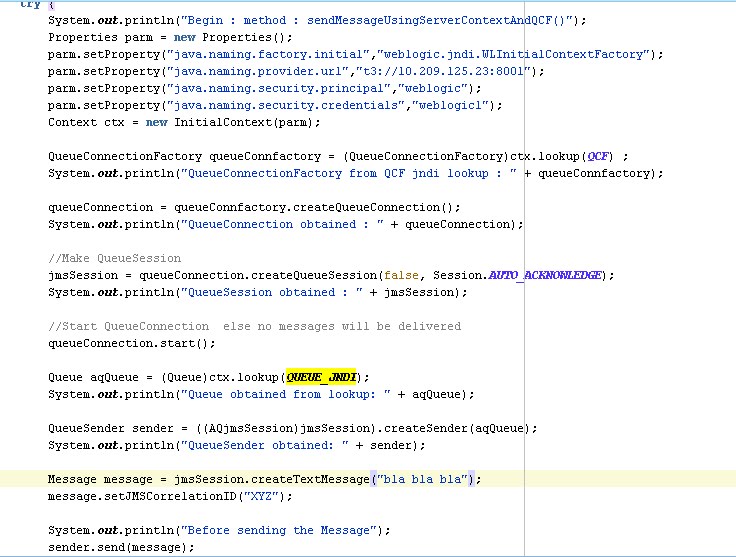
Here is my Java code that connects to the Queue.